What is My OpenLab?
My OpenLab is where you can access all courses, projects, and clubs of which you’re a member or that you’ve created, change your settings, and generally manage your account.
You can find My OpenLab two ways:
1. You can find it toward the left of the top navigation bar:
2. And you can find it at the very right end of the main menu:
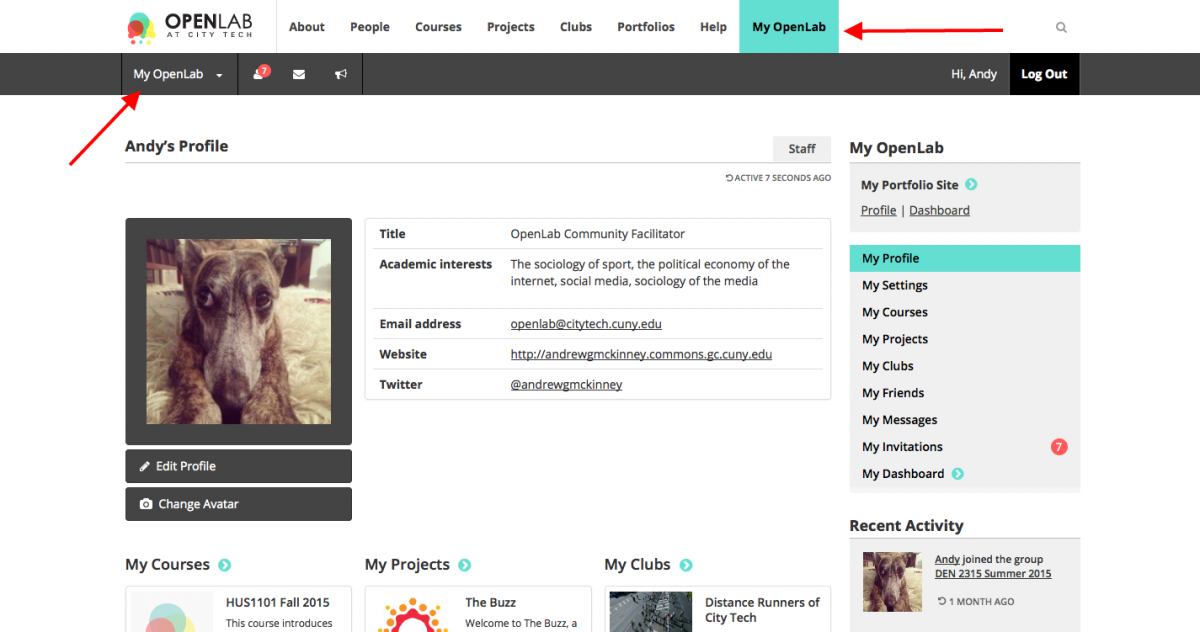
3. When you get to My OpenLab, you will see eight items in the right hand navigation bar:
- My Profile
- My Settings, which includes:
- My Courses
- My Projects
- My Clubs
- My Friends (coming soon!)
- My Messages (coming soon!)
- My Invitations (coming soon!)
Click any of the items in the above list to learn more about that specific area of My OpenLab.